Ceramic
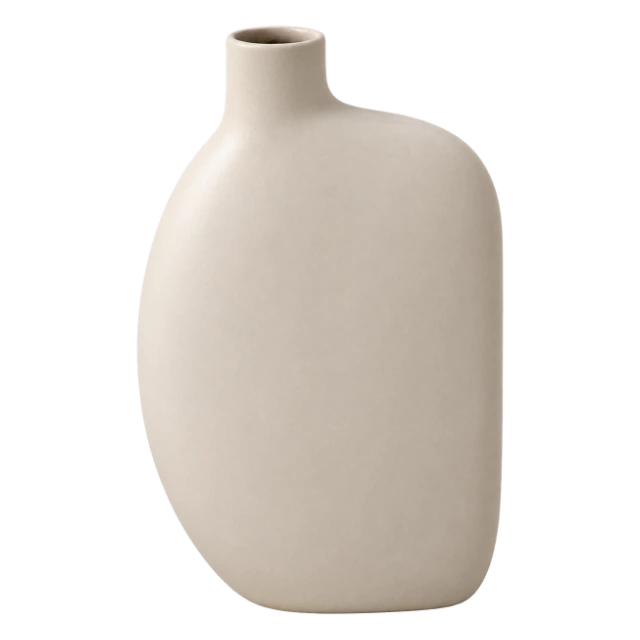
Offset-neck vase
A soft oval body with one flat side and a short neck to the left. A distinctive shape for an open shelf or console.


SHELF & SHAPE
One language of objects, two themes. These working components are also used in the shop.
--canvas--surface--mineral--text--muted--border--accent--focusCeramic
A soft oval body with one flat side and a short neck to the left. A distinctive shape for an open shelf or console.

The symbol is SVG. The full lockup retains the approved raster lettering.
Build your own shelf.
Objects that work together
An object does not need to fill a space to make its presence felt.
Headings use the Source Serif 4 Bold serif, body text uses the Commissioner sans (variable weight). Both are OFL-licensed and embedded in the template: Latin, extended Latin and Cyrillic. Chinese and Japanese use their own Noto Serif and Noto Sans. Body text 17–18 px, line height 1.55; 1.65 for CJK. H1 36–64 px, H2 30–46 px, H3 21–24 px.
Container up to 1440 px with 40 px margins, 24 px on tablet and 20 px on phone. Spacing step 8 px. Sections have 64 px vertical padding, 40 px on phone. Controls 48 px, radius 8, inset 16, icon 20, gap 8.
Objects are photographed on a clean background in the same light; rooms share the same palette. One set of photos serves both themes. Icons are line icons, 20 px, 1.6 stroke. Motion only explains a change of state, with no automatic carousels; with reduced motion everything works without animation.
Control: primary / outline / quiet / icon; 48 px, radius 8, inset 16, icon 20, gap 8. Header, catalogue, object, list, editor and this page.
Selection: closed / open / hover / focus / selected; one component for category, material, variant and language.
ProductCard / ProductDetails: one object model, name, materials, dimensions and variant, with no invented prices.
Modal: menu, list and editor; native dialog, Escape and focus return.
One source and tokens for our C system, with no UI from neighbouring sites.
Edit text, photos and object details while keeping the page structure.
Choose a place you would like to add to. Explore a composition, then open an individual object to check its shape, colour and dimensions.
Solid objects list width, depth and height. Flat textiles list width and length. Measure the available space before choosing, rather than the whole piece of furniture.